IGRS AP EC Search – Download Encumbrance Certificate & Check Property Records
Before investing in property, verifying its legal status is crucial to avoid hidden loans, disputes, or ownership issues. The IGRS AP EC (Encumbrance Certificate) is a government-verified document that reveals every financial claim, mortgage, or legal issue attached to any property in Andhra Pradesh—instantly available online through the official igrs.ap.gov.in ec portal.
The Integrated Grievance Redressal System of Andhra Pradesh (IGRS AP) is a centralized digital platform developed by the Registration & Stamps Department that offers access to property-related records, registered documents, encumbrance certificates, market value details, and registration services. It enables citizens to verify property history, check ownership transfers, assess legal liabilities, and obtain government-issued documents without visiting the Sub-Registrar Office (SRO).
Overview of IGRS AP
The IGRS AP system digitizes important land and property records, ensuring transparency and simplifying property verification for buyers, sellers, legal professionals, banks, and government agencies.
Major Services Available:
- Encumbrance Certificate (EC) search
- Certified Copy (CC) download
- Market value (basic rates) lookup
- Prohibited properties list
- Document registration and slot booking
- Duty and fee calculation
- Property transaction history view
These services help citizens obtain essential information before executing any real estate transaction.
Encumbrance Certificate (EC) in Andhra Pradesh
What is an EC?
An Encumbrance Certificate (EC) is an official document issued by the Sub-Registrar Office that records all registered transactions related to a property. It shows whether the property has any financial liabilities, registered mortgages, legal claims, or ongoing disputes.
An EC typically includes:
- Registered sale deeds
- Gift deeds
- Partition deeds
- Mortgage registrations
- Release deeds
- Court orders affecting the property
- Property transfer history
- Liabilities affecting title clarity
An EC is mandatory for due diligence, home loan approvals, and secure property transactions.
Importance of IGRS AP EC
The Encumbrance Certificate plays an essential role in:
- Verifying whether a property is free from encumbrances
- Ensuring that the seller has a clear and transferable title
- Checking for outstanding home loans or mortgages
- Identifying legal disputes and registered cases
- Confirming ownership continuity
- Applying for bank loans or government approvals
- Withdrawing PF for property purchase
Important: Without a recent EC, no buyer should proceed with a real estate transaction.
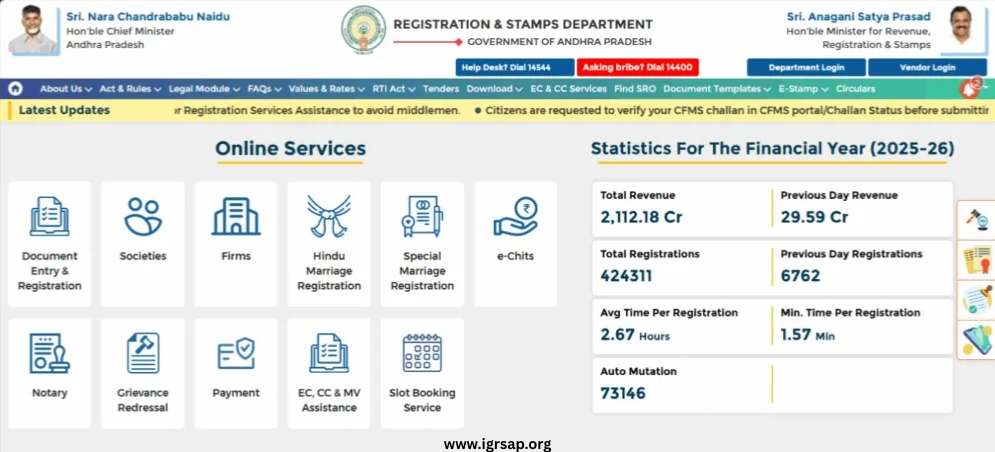
How to Search & Download IGRS AP EC Online
The online EC search feature allows citizens to instantly check encumbrances without visiting the SRO.
Step 1: Visit the EC Search Portal
Open the official EC search service page of the Registration & Stamps Department at https://registration.ap.gov.in
Step 2: Open EC & CC Services
Navigate to “EC, CC & MV Assistance” to access all encumbrance-related services.
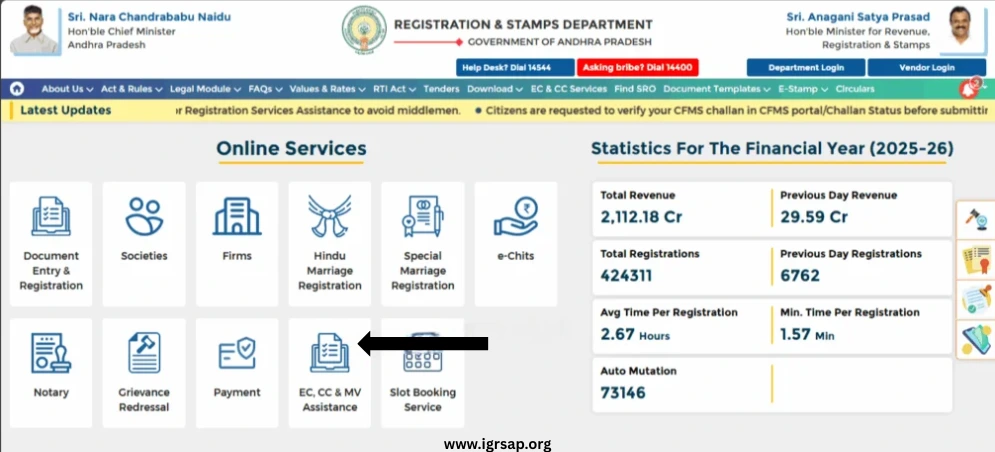
Step 3: Select EC Type
Two options are available:
Option A: EC for Information Only
- Unsigned
- Used for general verification
- Free to download
- No login required
- Not valid for legal purposes
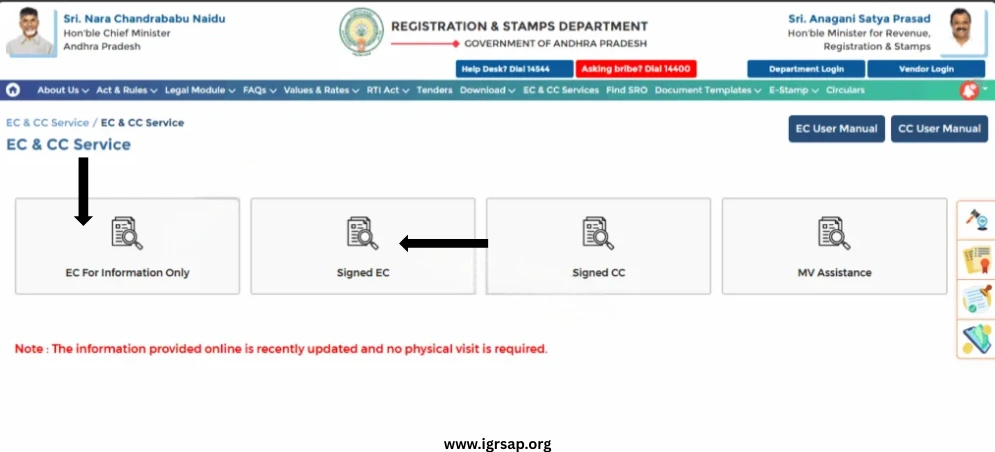
Option B: Signed EC
- Digitally signed
- Legally valid for loan and legal purposes
- Requires user login
- Accepted by banks and courts
- Minimal fee applicable
Step 4: Enter Search Details
Search can be performed using:
- Document number
- Memo number
- House/Flat number
- Plot/survey number
- Apartment details
- Property address
- SRO name and district
Pro Tip: If you don’t have the document number, you can search using survey number or property address.
Step 5: Submit Request
Complete the verification (captcha) and submit.
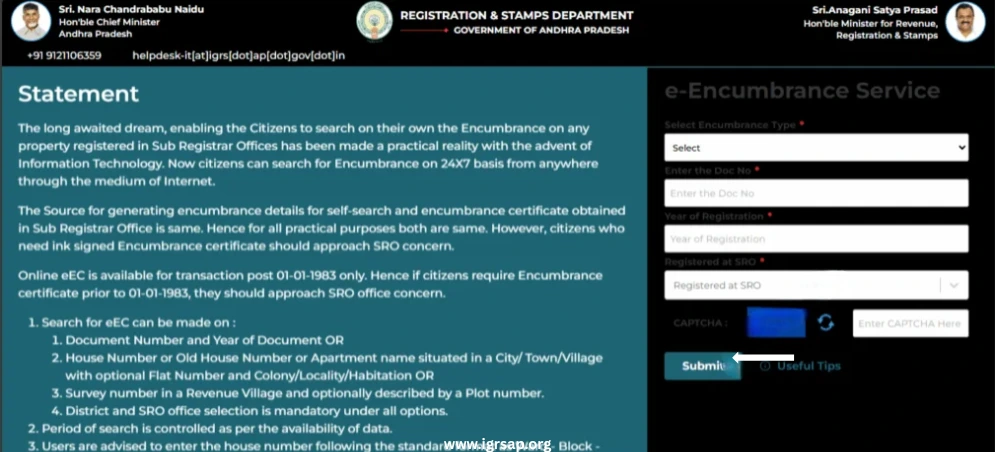
Step 6: View or Download EC
The EC will display:
- Owner name
- Property description
- All registered transactions
- Date-wise entries
- Mortgage details
- Court orders
- Sale/gift history
Users can download or print the certificate instantly.
Offline Process to Obtain EC from Sub-Registrar Office (SRO)
Citizens can also obtain EC offline by visiting the nearest Sub-Registrar Office.
Step 1: Collect Required Documents
- Property details
- Survey/plot number
- Old sale deeds
- Government ID proofs
Step 2: Fill EC Application Form
Provide:
- Property description
- Document numbers
- Period for which EC is required
- Owner name
Step 3: Submit Application & Fees
Pay the applicable fees based on search duration.
Step 4: Collect EC
EC is usually issued within 7–15 working days.
Types of Encumbrance Certificates in Andhra Pradesh
Form 15 – Encumbered EC
Issued when:
- Mortgages are active
- Home loans exist
- Court cases are recorded
- Any registered liability exists
What This Means: The property has legal or financial issues attached to it. You cannot proceed with purchase or sale until these are cleared.
Form 16 – Nil Encumbrance Certificate
Issued when:
- No encumbrances are found
- No loans, mortgages, or legal claims exist
- Property is clear for sale and transfer
What This Means: The property is clean and safe for transaction. Banks prefer Form 16 for loan approvals.
Important: Always aim for Form 16 (Nil Encumbrance Certificate) when buying property. If you get Form 15, investigate every encumbrance listed before proceeding.
Certified Copy (CC) – Download Process
A Certified Copy is an officially signed copy of a registered document such as a sale deed, mortgage deed, gift deed, or partition deed.
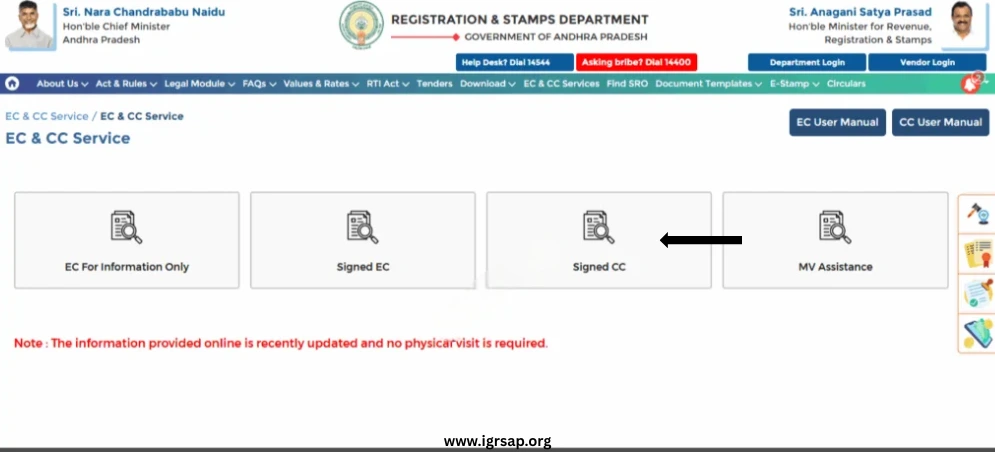
How to Download a CC Online
Step 1: Go to EC & CC Services at registration.ap.gov.in
Step 2: Select “Signed CC”
Step 3: Log in using your credentials (CARD PRIMME Account)
Step 4: Enter the following:
- District
- SRO
- Document number
- Registration year
Step 5: Submit and Download
The digitally signed Certified Copy will be available for download in PDF format.
Market Value (IGRS AP Market Value / Basic Rates)
The market value (basic value) defines the minimum value at which a property can be registered in Andhra Pradesh.
IGRS Provides:
- Basic value of land
- Basic value of flats/apartments
- Minimum rates for stamp duty calculation
- District-wise market value
- Village-level property rates
How to Check Market Value Online
- Open “Market Value” service
- Select district and mandal
- Choose survey number or plot number
- View market value per square yard or square meter
Why This Matters: This helps buyers verify whether the property is registered at the correct value. It prevents undervaluation (which is illegal) and overvaluation (which costs you more in stamp duty).
IGRS AP Prohibited Properties List
The Registration & Stamps Department maintains a list of properties that cannot be sold, registered, or transferred.
Prohibited Properties Include:
- Assigned lands
- Endowment properties
- Government-owned land
- Land under litigation
- Wakf properties
- Forest land
- Temple properties
- Properties with restrictions by court order
Users Can Search:
- District-wise prohibited lands
- SRO-wise restricted records
- Survey numbers under ban
- Land with government claims
Critical Warning: Checking the prohibited properties list is essential for fraud prevention. Never skip this step.
Property Registration under IGRS AP
IGRS AP allows citizens to complete various registration-related tasks:
- Document registration
- Appointment/slot booking
- Duty & fee calculation
- Stamp duty payment
- Property tax linkage
- Submission of required documents
General Steps for Registration
Step 1: Prepare the documents
Step 2: Calculate stamp duty & fee
Step 3: Pay applicable charges
Step 4: Book a registration slot
Step 5: Visit SRO with parties & witnesses
Step 6: Complete biometric and verification
Step 7: Document gets registered
Step 8: Collect registered copy or download CC
Documents Required for EC and Registration
For EC Application
- Survey number / plot number / door number
- District, mandal, village
- Old sale deeds
- ID proof
- Period required (years)
For Registration
- Sale/Gift/Partition deed
- Seller & buyer ID proofs
- PAN card
- Passport-size photographs
- Link documents
- Property tax receipts
- Encumbrance certificate
- Land conversion certificate (if applicable)
Fee Structure for EC in Andhra Pradesh
| Duration | Fee |
|---|---|
| Search up to 30 years | Approx. ₹200 |
| Search beyond 30 years | Approx. ₹500 |
| Digitally signed EC | Additional charges may apply |
| Certified Copy | Based on document type |
Common Issues & Solutions: IGRS AP EC Search Troubleshooting
EC Search Returns “No Results Found”
Possible Causes:
- Older records before computerization may not be available online
- Incorrect document number format
- Wrong SRO selected
- Property registered under different spelling of owner’s name
Solutions:
- Visit SRO for manual search of pre-1983 records
- Double-check document number—remove spaces and special characters
- Try alternate search methods (survey number instead of document number)
- Verify SRO name matches the registration office
- Try searching with property address or survey number
Wrong or Duplicate Entries in EC
Description: Your EC shows two sale deeds for the same property on different dates, or shows a mortgage that was already cleared.
Solutions:
- Visit the Sub-Registrar Office immediately
- Carry supporting documents (loan clearance certificate, release deed)
- File a correction request with proper evidence
- Get a revised EC after correction
- Processing time: 7-15 working days
Signed EC PDF Not Opening
Error Message: “Cannot verify digital signature” or “File is corrupted”
Solutions:
- Download and install Adobe Acrobat Reader (not browser PDF viewer)
- Ensure your PDF reader supports digital signature validation
- Don’t use mobile phone—open on desktop/laptop
- Clear browser cache and re-download
- Try downloading in a different browser (Chrome, Firefox, Edge)
- Check if antivirus is blocking the download
Property Not Appearing in Market Value Search
Solutions:
- Verify district and mandal selection
- Check if property falls under special economic zone
- Try searching with revenue survey number instead of plot number
- Contact SRO to confirm if property is in new layout (may not be updated in system)
- For very new developments, market value may take 3-6 months to appear online
Prohibited Property Flag Appears
What It Means: Your property shows “Restricted” or appears in the prohibited list.
Solutions:
- Note down the exact reason for prohibition
- Visit district Sub-Registrar Office with original documents
- Check if prohibition is due to:
- Unpaid property tax
- Court order
- Government acquisition notice
- Pending litigation
- Resolve the underlying issue with proper documentation
- Request removal from prohibited list after clearance
- Never proceed with transaction until this is resolved
Login Issues for Signed EC
Error: “Invalid credentials” or “User not registered”
Solutions:
- Register for CARD PRIMME Account first (separate registration)
- Use correct email ID used during registration
- Reset password if forgotten
- Clear cookies and cache
- Wait 24 hours after registration before first login
- Contact helpline: 0863-2329564
Payment Failed But Amount Deducted
Solutions:
- Wait for 24-48 hours for automatic refund
- Note down transaction ID immediately
- Take screenshot of payment confirmation
- Don’t retry payment immediately
- Contact IGRS helpdesk with transaction details
- Visit SRO with bank statement if amount not refunded in 7 days
EC Shows Active Mortgage But Loan Was Paid
Why This Happens: Bank may not have registered the release deed after loan closure.
Solutions:
- Contact your bank immediately
- Request NOC (No Objection Certificate) and release deed
- Ensure bank registers the release deed at SRO
- Wait 7-10 days for system update
- Download fresh EC to verify mortgage removal
- Keep loan closure certificate as proof
Mobile Number/Email Not Receiving OTP
Solutions:
- Check spam/junk folder for email OTP
- Ensure mobile number is active and has network
- Wait 2 minutes before requesting resend
- Try alternate email ID if available
- Clear browser cache
- Use desktop instead of mobile browser
- Disable VPN if active
Unable to Download EC (Download Button Not Working)
Solutions:
- Disable popup blocker in browser settings
- Right-click on download link → “Save Link As”
- Try different browser (Chrome recommended)
- Check if download folder has write permissions
- Temporarily disable antivirus/firewall
- Clear browser cache and cookies
- Try during non-peak hours (early morning or late evening)
Best Practices for Safe Property Transactions
Before Buying Property:
- Obtain EC for at least the past 30 years (some banks require 13 years minimum, but 30 years is safer)
- Verify prohibited property status on IGRS AP portal
- Cross-check sale deed details with EC entries
- Confirm ownership through government records (Patta, FMB, Tax receipts)
- Check municipal approvals for buildings
- Validate digital signatures on signed EC
- Consult legal experts for any disputes shown in EC
- Prefer registered survey maps and approved layouts
During Property Verification:
- Visit property physically and verify boundaries
- Talk to neighbors about any known disputes
- Check property tax receipts for continuity
- Verify seller’s identity documents match EC owner name
- Ensure patta is in seller’s name
- Check for any unauthorized constructions
- Verify DTCP/HUDA approvals for layouts
After Purchase:
- Register sale deed immediately in your name
- Update patta in revenue records within 30 days
- Obtain fresh EC in your name after registration
- Update property tax records
- Keep all original documents in bank locker
- Get property insurance
- Update address for official communication
Difference Between EC, Sale Deed, and Patta
| Document | Purpose | Issued By | Significance |
|---|---|---|---|
| Encumbrance Certificate | Shows liabilities & transaction history | SRO | Confirms legal status |
| Sale Deed | Transfers ownership | SRO | Primary ownership document |
| Patta | Land ownership record | Revenue Department | Government certification of ownership |
Key Understanding:
- EC = Legal status report (like a property’s credit report)
- Sale Deed = Ownership proof (like property’s birth certificate)
- Patta = Government record (like property’s Aadhaar card)
All three serve different purposes. You need all of them for complete property verification.
Take Action: Secure Your Property Investment
Don’t risk your property investment with incomplete verification. The IGRS AP EC system provides you with instant access to complete property history that could save you from hidden mortgages, ongoing legal disputes, properties under government acquisition, and fake sellers with no legal rights.
Start Your IGRS AP EC Search Today:
Step 1: Visit https://registration.ap.gov.in
Step 2: Click “EC, CC & MV Assistance”
Step 3: Download your property’s complete legal history in minutes
A thorough EC check today prevents legal complications tomorrow. In just 10 minutes and approximately ₹200, you can protect an investment worth crores.
Helpful Resources & Contact Information
Official Portals:
IGRS AP Main Portal: https://registration.ap.gov.in
EC Search Portal: https://registration.ec.ap.gov.in/ecSearch
Stamp Duty Calculator: Available on main portal
Contact Details:
Helpline Number: 0863-2329564
Email Support: Available on official portal
Working Hours: 10:00 AM to 5:00 PM (Monday to Saturday)
SRO Locator:
Use the “Know Your SRO” feature on IGRS AP portal to find:
- Nearest Sub-Registrar Office address
- Contact numbers
- Working hours
- Services available
Conclusion
The IGRS AP system provides essential services for property verification and registration in Andhra Pradesh. Through online EC search at igrs.ap.gov.in ec portal, certified copies, market value lookup, prohibited property verification, and registration services, citizens can make informed and legally secure decisions.
Ensuring that a property is free from encumbrances, disputes, or prohibited status is crucial before entering into any real estate transaction. Whether you’re buying your first home, applying for a loan, or verifying inherited property, the IGRS AP EC search is your first line of defense against property fraud.
A thorough EC search, market value check, and document verification safeguard buyers from potential legal complications and ensure transparent transactions across the state.